

Centralized mAGI
mAGI is NinjaCat's centralized AI conversation space — a single place to get work done with AI, without first having to decide which agent to use or which copy of an agent is the right one. mAGI acts as an orchestrator: you describe what you need, and mAGI coordinates your assigned agents (as sub-agents) to complete the task, handling the rest itself.
Who can use mAGI?mAGI is currently in a Beta phase. If you don't see it yet, it is because we are still testing this new feature out with a small subset of users before enabling for all.
What is mAGI?
Before mAGI, getting work done with NinjaCat's AI meant starting in the right individual agent every time. mAGI removes that friction by giving you one unified conversation space that can:
- Understand your request and break multi-step work into a clear plan.
- Delegate to your specialist agents — the agents your organization has already built become mAGI's sub-agents (the ones that you assign to her), so mAGI can hand off the parts of a task best suited to each one.
- Do the rest itself, pulling everything together into a single conversation.
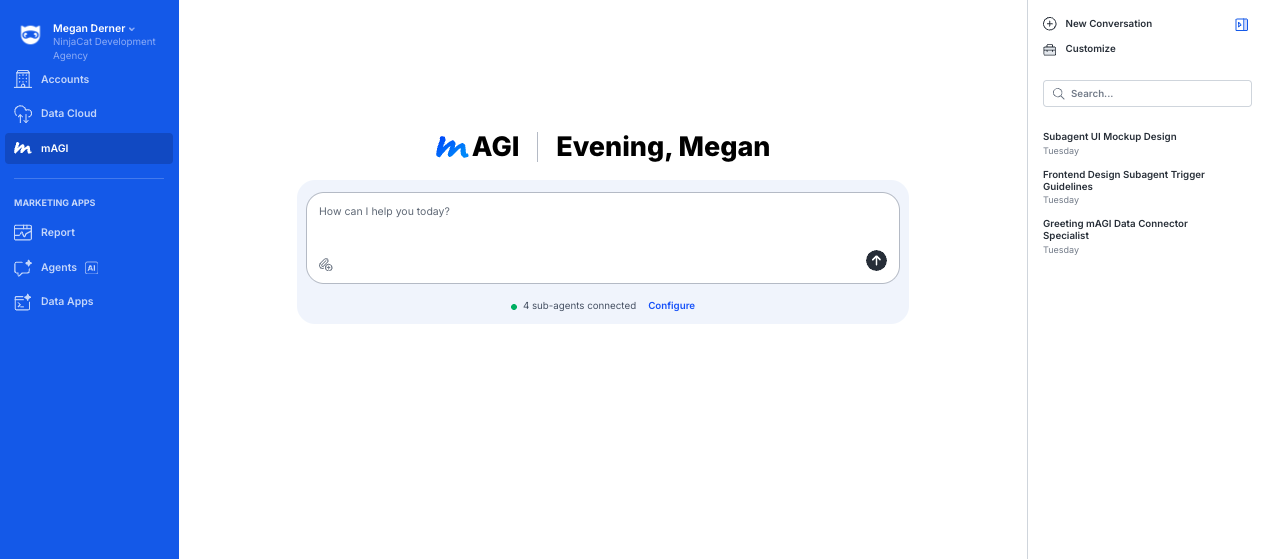
You'll find mAGI as a dedicated option in the left-hand navigation bar.
The mAGI conversation space
Opening mAGI takes you to a focused workspace built around a single conversation. On this page you'll find:
- The central conversation — where you chat with mAGI and it does the work.
- Conversation history — on the right-hand side, just like your history with individual agents. You can revisit, rename, and continue past conversations.
- Connected sub-agents — a view of how many of your agents are currently available to mAGI as sub-agents.
Planning multi-step work
mAGI can plan its way through complex, multi-step requests. When a task has several parts, mAGI lays out a plan and works through it step by step — so you can follow along and see how your request is being handled.
Configuring mAGI
Admins can tailor mAGI to fit how your agency works. The configuration section lets you set:
| Setting | What it does |
|---|---|
| Custom instructions | Add your own guidance on top of mAGI's built-in instructions, so mAGI behaves the way your team expects. This is really where you should tell mAGI when to leverage each of the subagents that have been assigned to her. |
| Model | Choose the AI model that powers mAGI. |
| Sub-agents | Select which of your built agents are available to mAGI as sub-agents. |
| Slack | Connect mAGI to Slack so you can work with it there. (Slack is the only connector available in this first version.) |
How mAGI knows what to domAGI comes with a built-in set of instructions, maintained by NinjaCat, that tells it how to act as an orchestrator — how to interpret your requests, plan the work, delegate to your sub-agents, and communicate clearly. Your custom instructions are added on top of this foundation. Because the foundation is shared, improvements NinjaCat makes to mAGI reach your account automatically.
Built-in agents
Beyond the agents you assign to mAGI yourself, mAGI also comes with built-in agents — specialist agents that NinjaCat assigns to mAGI to extend what she can do. You don't set these up: NinjaCat assigns them, and once assigned their capabilities become part of mAGI automatically, ready for anyone on your team to use.
Built-in agents are different from the sub-agents you select in mAGI's configuration:
| Built-in agents | Your sub-agents | |
|---|---|---|
| Who assigns them | NinjaCat | You (a Super Agent Admin) |
| What they are | NinjaCat-authored specialists that ship with mAGI | Agents your organization has built |
| How you manage them | Always available — nothing to turn on | Selected in mAGI's configuration |
What mAGI's built-in agents can do
Each built-in agent is a specialist mAGI can hand work to during a conversation. mAGI decides when to bring one in based on what you ask — you just chat with mAGI normally.
A note on permissions. Every built-in agent requires the same baseline access needed to use mAGI at all (see Permissions below). Some built-in agents require an additional permission on your role. If you don't hold a permission a built-in agent needs, mAGI simply won't use that agent for you — and she'll tell you which permission to ask your admin for. Access is evaluated per organization and per user role.
| Built-in agent | What it does | Permission to use it |
|---|---|---|
| Smart Connector Agent (Beta) | Builds a custom data connector for a third-party API from end to end — it researches the API, writes and reviews the connector, deploys and runs it, and registers the result as a dataset you can use in NinjaCat, confirming each step worked before reporting back. Any credentials it needs are collected through a secure in-chat prompt and are never written into code or output. | Baseline mAGI access plus the Manage Networks permission. |
| SQL_V1 Transformation Builder and Editor (Beta) | Helps you work with SQL transformations in your organization: it can find and inspect existing transformations (including their configuration, input fields, and version and run history) and author new SQL_V1 transformations — previewing SQL against your datasets, saving, renaming, and republishing. Works within your own organization only, and supports SQL_V1 transformations only. Good to know: saved changes go live immediately (there's no draft step), and renaming a dataset can break the SQL in transformations that depend on it. | Baseline mAGI access plus the Data Cloud permission. |
| DataCloud Dana (Beta) | A Data Cloud assistant. Has access to all existing Datasets in the Dataset Library, can search for, query and investigate all. | Baseline mAGI access plus the Data Cloud permission. |
| Agent Supervisor (Beta) | An oversight agent that has access to all existing Agents in the Agent Library. Also has access to all agent configurations and past conversations with each agent. (Soon to come: Cost and Credit information). For this, Agent Supervisor is able to recommend configuration optimizations based on user conversations and the current configurations of those agents. | Baseline mAGI access. |
More capabilities over timeBuilt-in agents are how NinjaCat expands mAGI's capabilities over time. We plan to add more built-in agents and tools to allow mAGI to manage majority of things in the NinjaCat platform.
Permissions
Access to mAGI is governed by two permission levels:
| Action | Permission required |
|---|---|
| Chat with mAGI | Agent View / Chat |
| Edit or manage mAGI (configuration, sub-agents, model, connectors) | Super Agent Admin |
Anyone with agent chat access can hold conversations with mAGI. Changing how mAGI is configured is limited to Super Agent Admins.
Frequently asked questions
Do I need to pick an agent before I start?
No — that's the point of mAGI. Start your conversation with mAGI and it will coordinate the right agents for you.
Which of my agents can mAGI use?
Whichever ones an admin selects as sub-agents in mAGI's configuration.
Can I use mAGI in Slack?
Yes. An admin can connect mAGI to Slack from the configuration section.
Can I still talk with my individual agents directly?
Yes. You can still work with your individual agents directly should you choose to do so.
Why don't I see mAGI in my navigation?
mAGI is being rolled out per agency. Reach out to your NinjaCat representative to have it enabled.
What are built-in agents, and are they different from my sub-agents?
Yes. Built-in agents (like the Smart Connector Agent) are specialists NinjaCat assigns to mAGI to extend her capabilities — they're always available and you don't manage them. Sub-agents are agents your own organization has built and that an admin selects in mAGI's configuration.
Updated about 2 hours ago