

Managing Agent-Level Access
Agent Permissions
For those users that have been given the Agent Access Permission (in User Settings), Agent Permissions at the Agent-level allows another level of control. You can control who can access, chat with and edit your Agents. You can set default access for your entire organization, then override those defaults for specific individuals when needed.
Accessing Permissions
You can manage permissions from four places:
- Agent Library: Click the ☰ menu on any agent → "Manage Access"
- Agent Conversation: Click the ☰ menu in the top right → "Manage Access"
- Agent Builder (creating a new agent): Click the Manage Permissions button next to Save
- Agent Builder (editing an existing agent): Open the More Actions menu and select Manage Permissions
Inside the Manage Permissions modal, changes are staged until you click Apply — so you can review or discard edits before they go live.
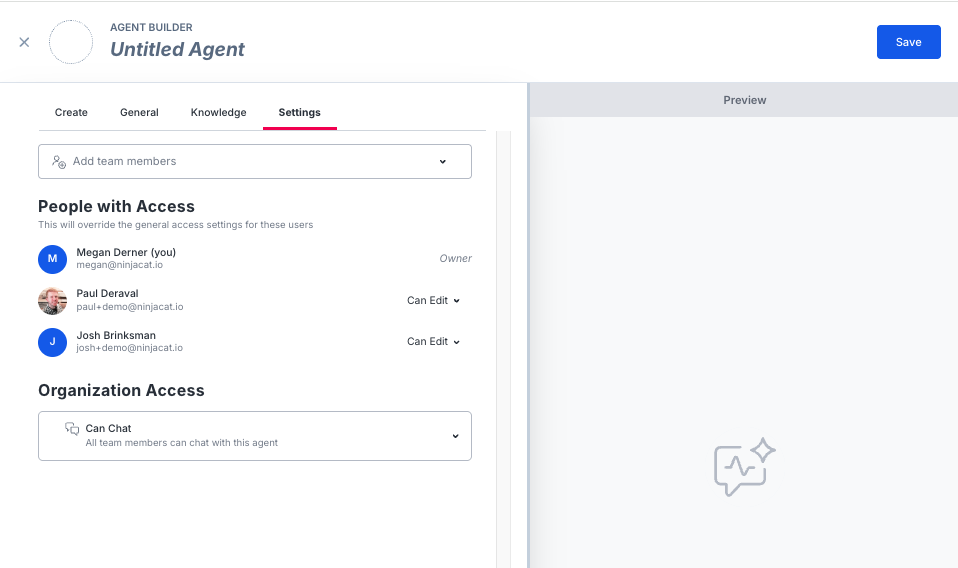
How It Works
Permissions operate on two levels:
- Organization Access — The default for everyone in your org with Agent Access enabled
- Individual Access — Overrides the org default for specific users you choose
When you create an agent, Organization Access defaults to Private, meaning the agent is visible only to you until you choose to share it. You can change this to Can Chat, Can Edit, or Owner from the agent's permissions settings whenever the agent is ready to share.
Note: This default applies only to newly created agents. Existing agents retain their current Organization Access setting and are not affected by this change.
Access Levels
| Level | Chat | Duplicate | Edit | Manage Permissions | Delete |
|---|---|---|---|---|---|
| Private | Owner only | Owner only | Owner only | Owner only | Owner only |
| Can Chat | ✅ | ✅ | ❌ | ❌ | ❌ |
| Can Edit | ✅ | ✅ | ✅ | ✅ | ❌ |
| Owner | ✅ | ✅ | ✅ | ✅ | ✅ |
What each level means:
- Private — Only the owner can see or interact with the agent
- Can Chat — Users can chat with and duplicate the agent, but cannot access the Agent Builder or change settings
- Can Edit — Users have full access to configure the agent and manage who else can access it
- Owner — The person who created the agent. Only the owner can delete the agent or set it to Private
Note: Ownership is assigned at creation and cannot be transferred through the UI.
Adding Individual Access
When you click "Manage Access," you can search for teammates to grant individual permissions. Only users with Agent Access enabled at the user level will appear in search results.
To remove someone's individual access, select Remove from their access dropdown.
Tips
- Keep new agents Private while you're building and iterating. Since agents now default to Private, take advantage of this to refine your prompt, datasets, and settings before sharing. When the agent is ready, open access by setting Organization Access to Can Chat or Can Edit.
- Set Organization Access to "Can Chat" or "Can Edit" when you want broad visibility across your team
- Use Individual Access to give specific people more (or less) access than the org default
- Only owners can set an agent to Private—this prevents editors from accidentally locking out the team
Updated 4 months ago