

Managing SEMRush API Usage in NinjaCat
NinjaCat's SEMrush integration gives you powerful access to SEMrush keyword, organic search, and competitor data directly inside your reports. Because SEMrush charges credits per row of data returned, understanding how NinjaCat requests data—and how to control that behavior—can help you avoid excessive credit consumption.
This article explains the potential issue with unrestricted API usage and the controls that now help you manage it.
The Problem: Excessive API Credit Consumption
Each SEMrush API row costs credits, with certain endpoints being especially expensive:
- domain_organic: 50 credits per row
- domain_organic_organic (competitor data): 200 credits per row
Without restrictions, NinjaCat could:
- Pull the maximum available rows per API call, up to 10,000 per request.
- Fetch two years of historical data when creating new reports, making many repeated calls.
- Segment requests by date, which could drastically multiply row counts.
This combination could deplete a monthly SEMrush credit allocation very quickly.
The Modifications Made
NinjaCat has implemented several changes and controls to reduce credit usage and give you more transparency and control.
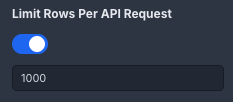
1. Limit Rows Per API Request
When enabled, you can now configure a maximum number of rows fetched per API call.
- Default limit: 1,000 rows
- Purpose: Prevent large data pulls that waste credits when a report only needs a few rows.
To use: Open your SEMrush data source or widget settings, find Limit Rows Per API Request, and set an appropriate value for your needs.
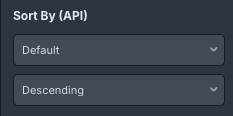
2. Sort By (API-Level Sorting)
- This new option allows access to API sorting on available fields before data is returned from SEMrush.
- If you don't configure Sort By (API), the SEMrush API applies its own default sort order automatically, so existing reports will continue to run as before.
Sorting at the API level lets you combine it with the Limit Rows Per API Request to request only the top results that matter most.
To use: In your SEMrush data source or widget settings, choose a field under Sort By.
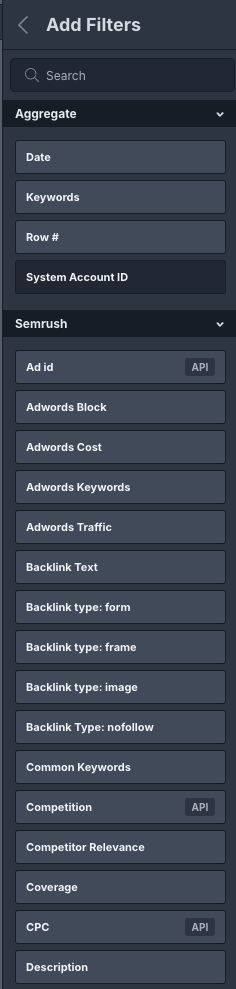
3. API Filters in the Filters Tab
API-level filters are now visible in the Filters tab, allowing you to see and adjust what is applied before data retrieval.
Benefits include:
- Clear visibility into active API filters
- Ability to refine filters before API calls
- Reduced credit/token usage by narrowing the requested data
To use: Open your SEMrush-connected widget or data source, then check or edit the options in the Filters tab.
4. Reduced Historical Backfill Window
Previously, NinjaCat attempted to backfill up to two years of SEMrush data when a report was created. This has been shortened to three months, automatically reducing initial credit consumption.
You don't need to change any settings—this update applies by default.
5. Date Segmentation Behavior
By default, NinjaCat no longer adds a date field to SEMrush requests unless you explicitly include it in your widget or data source.
- If you include a date field, SEMrush data is segmented by date as expected.
- If you do not include a date field, SEMrush data is returned without date segmentation and attributed to the overall date range of the request.
This change helps reduce unnecessary API calls and credit usage while still allowing you to add date-level detail when you need it.
Best Practices for Managing SEMrush Credits
- Set a Limit Rows value that matches the number of rows your report displays.
- Use Sort By at the API level to ensure you only pull the most relevant rows.
- Apply API-level Filters to narrow the data fetched before credits are used.
- Avoid large date ranges to reduce the number of API calls.
- Add new SEMrush-connected reports gradually and monitor credit usage.
Frequently Asked Questions
Will these changes affect existing reports?
No. These options are not enabled automatically. A user must manually edit the template and turn on Sort By and Limit Rows for them to take effect.
What is the default row limit?
1,000 rows per request. You can lower this (e.g., to 10 or 20) if your report only needs a small number of rows.
Can I retrieve more than 3 months of historical data?
No, not at this time. A single setting currently controls both the automatic backfill window and how far back the provider allows access via the API, and this is set to a maximum of 3 months.
Updated 8 months ago